Step Up Authentication


Overview
I led the design vision for Asurion’s two-factor authentication flow (2FA), significantly improving account security while helping recover engagement after a security vulnerability caused a 70% drop in account traffic.
I collaborated cross-functionally with product, engineering, fraud, and design teams to increase transparency around how Asurion protection plans integrate with carrier experiences, reducing customer confusion and strengthening brand presence. I also established and refined authentication design patterns to better align with industry standards and customer expectations.
Problem to solve
Asurion identified a security vulnerability in the existing sign-in flow. A customer could inadvertently create an account using an email address that belongs to someone else. The actual owner of that email would receive a welcome message, sign in using a one-time passcode (OTP), and gain access to another customer’s personal and plan information.
Single factor authentication is not secure enough. We need a way for customers to prove ownership of their protection plan(s).
Opportunities

Implement stronger security measures to support current and future functionality within the Asurion account

Increase account engagement by simplifying access and replacing the temporary Persona Verification flow, which caused a 70% drop in traffic
Research & Discovery
Part 1: Internal Research
Questions to answer
What design patterns are currently being used in live experiences with SMS OTPs and verification codes?
Is there opportunity to unify or update the components and design system?
I focused my review on the mobility and home claims flows, paying close attention to the language used, how “carrier pin” was explained, and how customers were presented with multiple verification options.
“Carrier pin” is a niche term specific to the phone insurance industry, and most customers are unfamiliar with both the term itself and the fact that they have been assigned this 4-to-6-digit security code that can be used to file a phone claim. Because of this, it was important to make the concept easier to understand and reduce potential confusion throughout the 2FA experience.

In this screen of the mobility claims flow, I learned that we donʼt use the term “carrier pin” anywhere customer-facing. Instead, we use the word “passcode”.

On the next screen, customers choose how they would like to receive their verification code, either via email or text. I used the existing claims experience as a pattern reference for presenting these options.
Doing this sort of internal audit was helpful for me to understand what patterns we're already using and if there was an opportunity to try and align patterns in Step Up.
Part 2: Competitor Research
Questions to answer
How do other companies handle 2-factor authentication?
What are the industry leading best practices?
What categories of information do other companies consider sensitive?
I reviewed experiences from a variety of companies to gather a broader range of examples beyond Asurion’s industry. These included Target, Chase, Google, Amazon, Discover, Airbnb, and Ulta Beauty.

Google’s authentication flow was particularly interesting because of the variety of verification methods offered. As shown here, users could authenticate in six different ways, including verification codes, phone notifications, an authenticator app, and an offline option. While we did not plan to support as many methods, I knew SMS OTP and carrier pin verification would be included. I wanted to study how Google presented multiple authentication options to customers in a clear and manageable way.
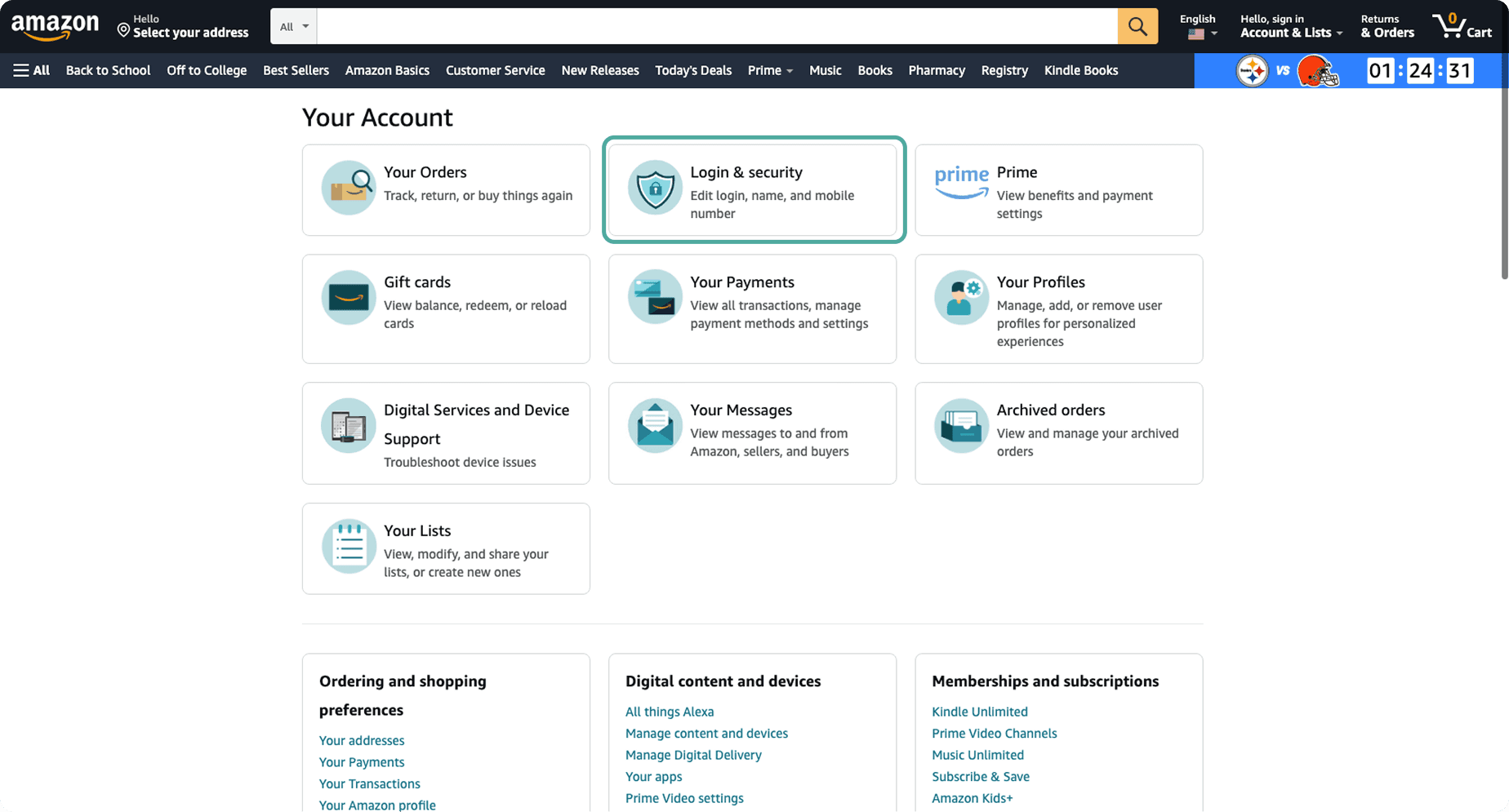
In reviewing other companies’ experiences, I also paid attention to which actions required customers to complete two-factor authentication. For example, on Amazon, selecting the “Login & security” card prompted a 2FA step, while the other account sections did not. This suggested that login credentials and contact information were treated as the most sensitive account details.

While researching Target, 2FA was required to edit my address.
Part 3: Microexperience Interviews
In addition to competitor research, we conducted interviews with several Microexperience (MX) teams to identify potential use cases for Step Up authentication. Our goal was to determine the best initial use case and identify which teams we could partner with to support implementation.
The Step Up platform would be developed and maintained by the AsurionID team, including both the functionality and front-end experience. However, implementation depended on partnerships with teams that owned specific customer experiences. For example, integrating Step Up into the claims flow required collaboration with the Claims team to determine when and how authentication should be triggered within their experience.
Service Initiation
Onboarding
asurion.com
My Account
Photos
We met with five teams and identified the Account experience as the highest-impact opportunity for an initial launch. We also uncovered additional integration opportunities across the organization. One example was the Service Initiation team, where Step Up could be used within the scheduling flow to verify a customer’s identity before allowing them to unmask sensitive information such as their home address during a TV installation appointment.
Solution
Goal: Design a two-factor authentication flow to verify that a customer is the owner of their protection plan.


The second factor of authentication is completed by either receiving an OTP on the customer’s phone or entering their carrier PIN. For the MVP, we launched with phone OTP only. By successfully completing both authentication factors, we can verify that the customer owns both the email address and the protection plan, allowing access to the most sensitive personal information within their account.

Step Up authentication also enables more personalized experiences based on a customer’s authentication level. Customers who have completed only the initial level of authentication (single factor) may have limited access to account information, with certain personal details masked or specific features, such as claims history, unavailable. Once they Step Up, they gain full access to their account and protected information.
What makes Asurion’s approach unique is that authentication must be tied to a specific mobile device number (MDN) associated with an active protection plan. Customers cannot authenticate using just any phone number; the MDN must be linked to a covered device, providing additional verification that they are the rightful owner of the plan.
Design considerations
Maintain visual and interaction consistency with the existing Asurion ID experience
Ensure the new flow is simple and quick to complete
Leverage existing design system components and patterns wherever possible to ensure consistency, scalability, and efficient implementation
Technical considerations
Solve for multiple use cases:
When we know which MDN the customer needs to verify
When we don’t know which MDN the customer needs to verify and they have more than one MDN on their account (edge case)
Verify with carrier pin (post-MVP)
Design Evolution
Version 1
Let the customer choose which method they want to verify with
Pros:
Uses design system radio button pattern
Cons:
Carrier pin will not be offered for MVP

Version 2
SMS OTP-first approach
Pros:
Reduces cognitive load for customer so they donʼt have to decide between methods right away
Allows us to easily add the carrier pin option down in the future as a link or secondary button
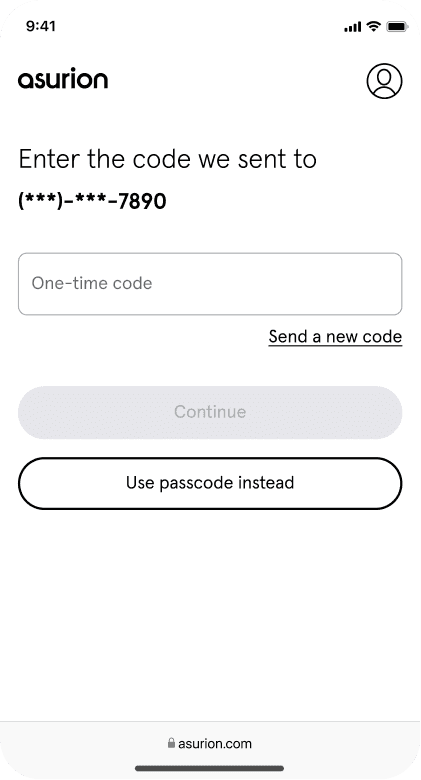
Version 3
Pros:
Improved copy from V2 gives customer more context as to why we are required this step
Matches sign in flow UI
Cons:
Masked phone number formatting is not the most accessible
Need find another spot to put the “Use a different one” link to account for adding carrier pin in the future

Version 4
Pros:
Last 4 of MDN is in sentence form, improving accessibility
“Use a different one” changed to an inline link and moved up to keep related info together and make room for carrier pin link underneath primary CTA
Carrier pin link can be easily added later once feature is available
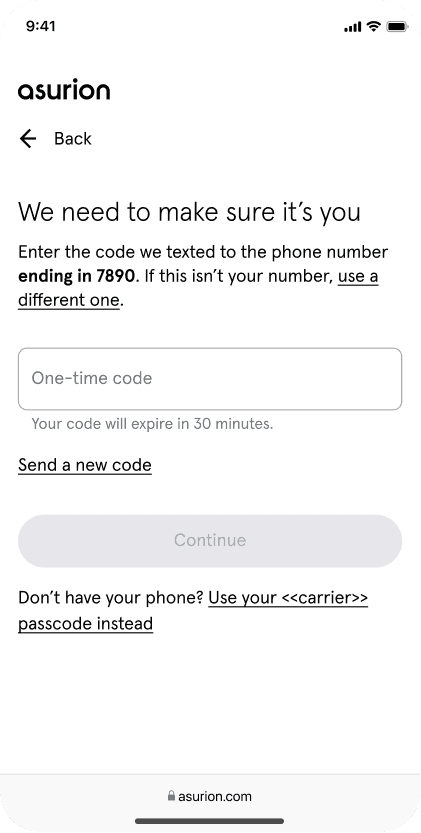
Final MVP designs
We know which MDN the customer needs to verify

We don’t know which MDN the customer needs to verify + they have more than one MDN on their account
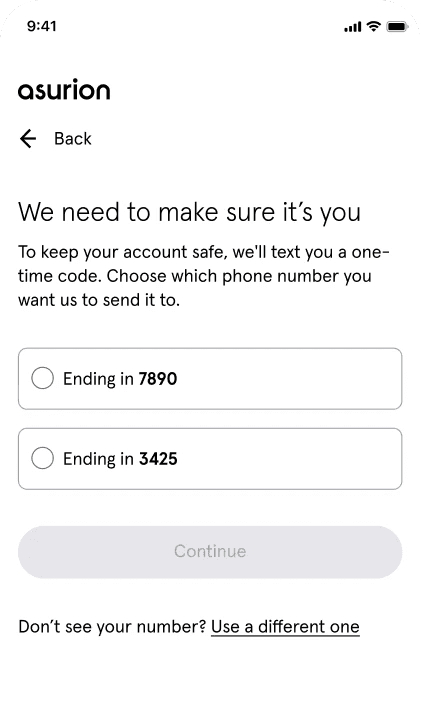
Step Up Authentication MVP Customer Experience
Follow up tests & Refinements
Following the launch of Step Up, my team and I focused on evolving the experience by introducing new features and optimizations based on customer and business needs.
New feature: Carrier pin validation
Enabled customers to authenticate using a carrier pin when their primary MDN is unavailable to receive an OTP.

Refinement: Box Input component
Replaced the standard text field with a dedicated OTP input component to improve usability and streamline code entry.

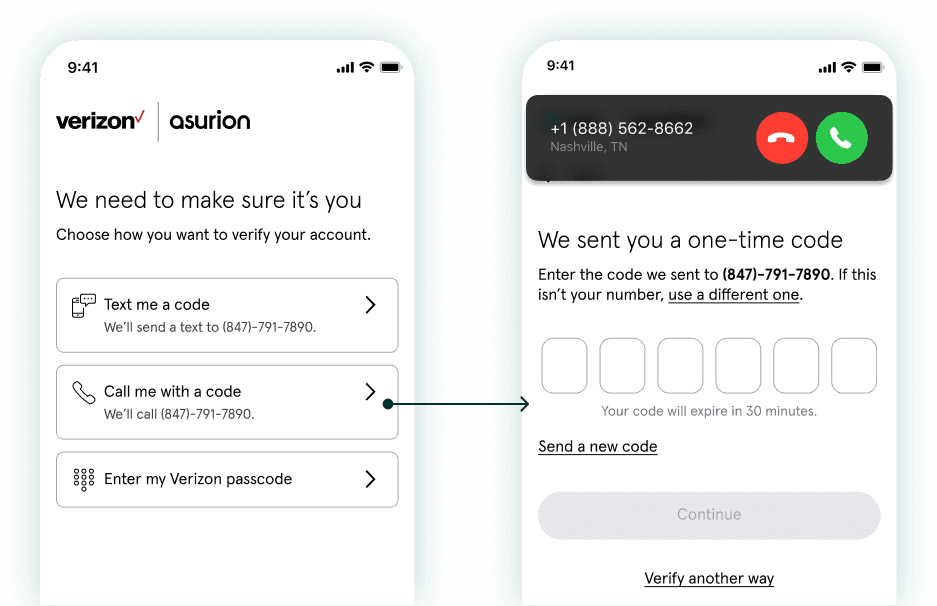
New feature: Voice OTP validation
Voice OTP allows customers to receive a verification code by phone call. This provides an alternative authentication method for customers who used a landline as their contact number or have accessibility needs.
Chat Transcript
“Hi, this is your request for a one-time passcode. To hear this message in English, please remain on the line. Your passcode is 123456. Press 2 to repeat, or hang up if you're done.”
(also offered in Spanish)


Read my next case study ->